

The Top Party Bus Rentals And Charter Bus Rentals In Denver!
Luxury Denver limo service
Why Choose Us?
The answer is simple; we depend on your happiness, so we'll go above and beyond to accomplish our goal with our transportation services. You'll find that we're the best in all areas, from vehicle quality to professional drivers and customer service. Our prices are fair, and our ground transportation is something you can't put a price on!
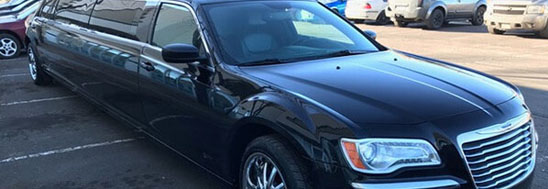


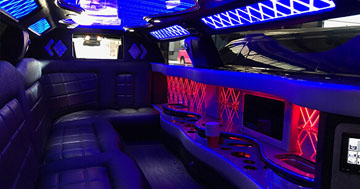

We are the area's foremost provider of a limousine, limo bus, Denver party bus, and corporate (executive) sedan/SUV drop-off service. We can provide luxurious transportation for any event. You can bet that a Limo Service Denver vehicle is in prime condition and a top-of-the-line specimen of vehicular beauty. Since our inception, we have been pursuing the highest level of excellence in the Denver Party Bus Service area and have achieved this with hard work, determination, and a little luck. So, if you are looking for reliable ground transportation service and a premier limousine company in Denver, Colorado, you've just found it; our luxury vehicles will be perfect for all your special events.
Whether you're planning a private party that involves bar hopping and pub crawl type festivities, a big event like a wedding along with its bachelor/bachelorette pre-nuptials, or a professional event like corporate events or a whole group of your coworkers heading out to a regional convention, we've got the vehicle that is just ideal for you. We know you'll be impressed with the leather seats, excellent sound system, colorful led lights, and all our Denver limo service amenities. We also have vast experience with birthday parties, providing our limo services for going on tours, trips with all your family members, and every special event you can think of. You're welcome to browse those vehicles here on our site or come to our lot and take a peek at them in person.
Some Event Services


Black Hawk Casino
Go to the best casinos in Colorado in the most comfortable, stylish, and safe way!

Red Rocks Amphitheatre
Enjoy seeing your favorite artists at this impressive concert venue with our luxurious vehicles!
Our Luxury Advantages
We take care to ensure you get your moneys worth from our services. It's just one of the ways that we put your happiness first and foremost! You'll always get the best from us, be it from our customer service agents or professional chauffeurs. It simply doesn't get any better than Denver Limo Service! The next time you need luxury transportation for a group of people, you'll know who to call. It's easy to reach us via telephone or email, so whatever is more convenient for you, just know that we're one dial or one click away. Our office staff knows everything there is to know about planning exciting trips in this area, including what all the hottest destinations are, so even if you are very early in the planning process, you can hit us up for some valuable information that you'll be able to put to good use during your outing with us.
Check Out Our Party Bus Fleet!

Denver, Colorado, is a fantastic place with a lot going on, but how can you experience it without the right kind of transportation? When it comes to the significant sporting events, parades and festivals, weddings, celebrations, and nightlife that happens here in Denver, the last thing you want to do is drive yourself to these fantastic events. When you consider things like the hassle of traffic, the stress of finding accurate directions, and the anxiety of finding a designated driver, renting the best limo service from us should be a top priority! We also provide airport limo service; if you need ground transportation to the Denver International Airport, you can be sure you will have a smooth ride and be on time!
Whether you are a local or just visiting, getting around downtown Denver and the greater Denver area, in general, is always a great plan, you hire our luxury transportation service to see all the best places in Denver, CO. But don't forget about our extensive service area; you can get our party bus and limousine services for trips to Fort Collins, Colorado Springs, Beaver Creek, and the Rocky Mountains to the best ski resorts. One of our Denver party buses, Denver limos, or stretch limousines will be perfect for your trip; you will enjoy all your ride and all the amenities our vehicles and excellent service have for you. You can choose from a Cadillac Escalade, Chevrolet Suburban, GMC Yukon xl, Chrysler 300, and Mercedes Sprinter.
Having a limousine or limo bus for your event is worth it. You don't have to take any smelly taxis, someone doesn't have to miss out on the fun by being the designated driver, and you don't have to drive yourself. Say you had a few drinks and think you are good to drive; you might get pulled over or into an accident. Both of those will cost a lot more than a limo bus would. A Denver limo or limo bus is also a lot safer and, of course, more fun. In the event that you are hiring this vehicle for your teens who are, for instance, celebrating a prom or a graduation, you'll have the peace of mind that you seek, knowing that they're in good hands with a professional chauffeur in a state-of-the-art vehicle—no texting and driving to concern yourself with, no designated drivers to worry about. You can enjoy a quiet evening at home while your kids party it up in our Denver party buses or Denver limos, all worry-free for both of you.
You don't have to deal with traffic, construction, parking, calling taxis, or waiting. You can enjoy yourself with all the amenities the vehicle has to offer. In the buses, there is dancing room with maybe even a dancing pole: color-changing lights and loud music for a club-like feel. Bar areas to get or make drinks. The party doesn't have to stop when moving from one spot to another. Let the chauffeur take care of everything. These exciting perks and features are used during trips to concerts at Red Rocks Amphitheater or the Bluebird Theater and sporting events at Mile High Stadium. Those seem to be when traffic and parking are the most hassles. It's worth the cost of our services to eliminate that concern alone. Enjoying any traffic you get stuck in is heavenly, and being dropped off and picked back up right at the door is pure ecstasy! Don't worry about other cities. We have you covered. If you need party bus service in the area we recommend Denver CO Party Bus Rental.
Our customer service agents are always friendly and happy, ready to help you by answering any questions you may have or booking your reservations. The chauffeurs we employ are friendly and give you the best night possible. They know the best routes around the city. That way, you never get lost, arrive on time, and get there safely. Also ensuring you get there safely are our professional mechanics who maintain the vehicles. That way, it's one less worry for you. These Denver limos and party buses are inspected and maintained at regular intervals, plus being cleaned after each and every trip, which means that they will run as smoothly for you as they did when they were brand new. We strive to keep them in like-new condition. We know you'll be able to tell that when you travel with us.
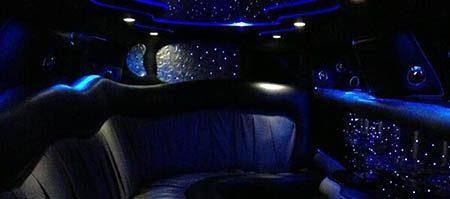
The best in features
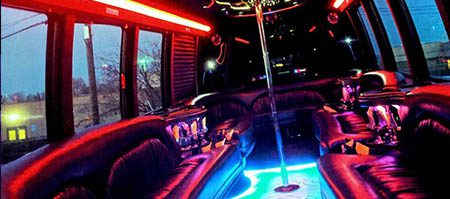
The best in comfort and luxury

The best in professional service
Our car service is open 24 hours a day. That means we can take your call when you have the time to make it. Even if you're an extreme night owl, take our word for it; you can call us anytime! We're still up late taking care of our late-night partygoers, so it's no problem at all. If you're the type who prefers to do everything via email, we have no problem with that either. We're always a click or a call away. But get in touch with us today to make your reservations. You don't want to miss out on the chance of getting the best limo service, shuttle bus, or party bus for your event, and we do get booked up fast when our high-demand seasons hit! Make sure that the limousine service of your dreams is available for you when you need it by reaching out to our ground transportation service today.